





A manufacturer with three plants often runs three companies by accident.
Each site has its own stock register, its own purchase habits, and its own way of reporting output. Head office receives three spreadsheets in three formats. By the time someone consolidates them, the numbers describe a factory floor that has already moved on.
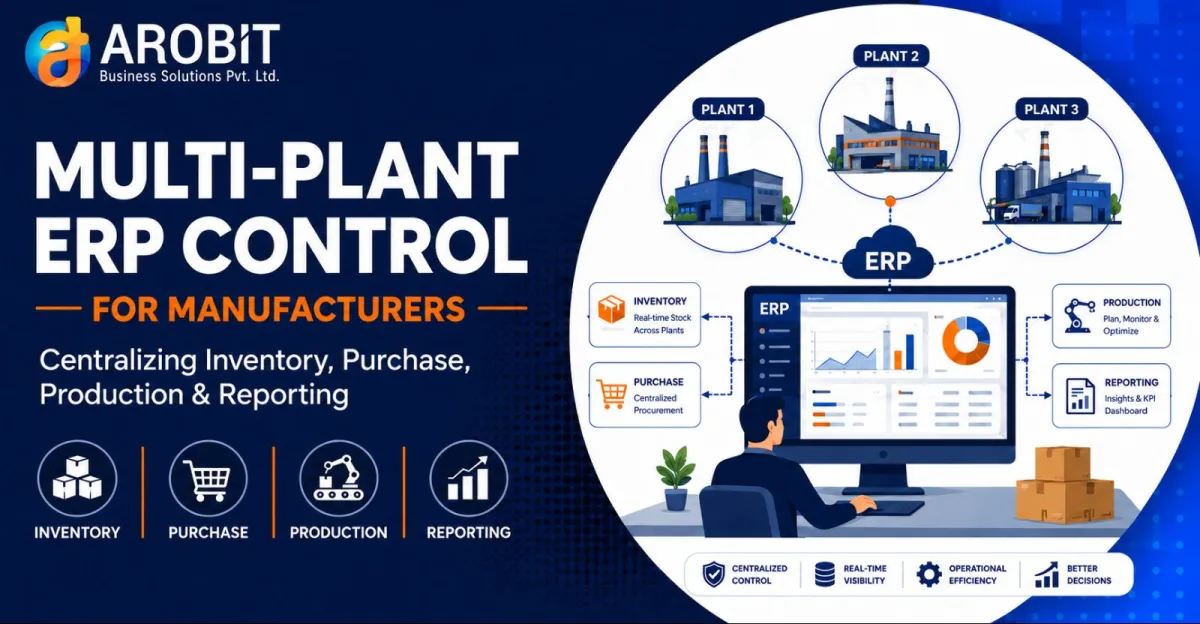
The plants are not the problem. The lack of a shared system is. A Multi-Plant ERP gives every site one set of records and gives head office one live view across all of them.
This article walks through what that control looks like across four functions, where the value sits, and what to check before you commit.
What Multi-Plant ERP Control Actually Means
A single-plant ERP runs one site well. Add a second plant, and most companies simply install a second copy. Now you have two databases that do not talk to each other.
A Multi-Plant ERP is one system with many sites inside it. Stock, purchase orders, production, and reports all live in a shared database. Each plant sees its own operations. Head office sees the whole network. The item code for a raw material means the same thing in every location.
That last point sounds small. It is the foundation everything else rests on. Without shared master data, consolidation is guesswork.
The cost of poor visibility across a network is well documented. McKinsey's 2024 Global Supply Chain Leader Survey found the gap between ambition and reality is wide:
Only 30% of businesses have achieved supply chain transparency beyond their tier-one suppliers. — McKinsey Global Supply Chain Leader Survey, 2024
The internal picture is often no better. Many manufacturers cannot see clearly across their own plants, let alone their suppliers.
Function 1: Centralized Inventory
When each plant tracks stock separately, three problems recur.
One plant runs short of a component while another sits on surplus. Nobody moves it, because nobody can see it. Buffer stock piles up at every site as insurance against a shortage that a transfer could have solved.
A Multi-Plant ERP shows stock across all locations in one view. A shortage at Plant A can be filled from Plant B's surplus with an internal transfer. Total inventory across the network falls, because the buffers no longer need to be duplicated.
This matters financially. McKinsey research links better visibility directly to working capital:
Manufacturers who improved supply chain visibility achieved 15–20% improvement in inventory turns. — McKinsey, supply chain visibility research
Higher inventory turns mean less cash tied up in stock that is not moving.
Function 2: Centralized Purchase
Separate purchasing means separate negotiations. Three plants buying the same steel from the same supplier at three different prices is common. So is three purchase teams doing the same paperwork.
Centralizing purchase in a Multi-Plant ERP changes your bargaining power. The system aggregates demand across plants. One purchase order can cover the combined requirement, which strengthens your position on price. Approvals follow one workflow. Vendor records are shared, so payment terms and rate history are visible to everyone.
Plants still raise their own requirements. The buying happens with the weight of the whole network behind it.
Function 3: Centralized Production
Production data is where most multi-plant setups go dark. Each plant reports output in its own rhythm, usually after the fact. Head office cannot compare plants on a like-for-like basis.
A Multi-Plant ERP standardizes the production record. Work orders, machine hours, yield, and rejection rates are captured the same way everywhere. That makes comparison possible. If Plant C's yield on the same product is lower than Plant A's, the number is visible, and someone can ask why.
It also enables load balancing. When one plant is at capacity and another has a free line, planners can route the work with full visibility of both.
Function 4: Centralized Reporting
This is the function that justifies the rest.
Without a shared system, reporting is a monthly assembly job. Someone collects files, reconciles formats, and produces a consolidated view that is already weeks old. Errors creep in at every merge.
A Multi-Plant ERP produces the consolidated report as a by-product of daily operation. Inventory value across the network, purchase spend by plant, production output by line, all available on demand. Head office stops waiting for month-end to see where the business stands. This is the single strongest argument for a Multi-Plant ERP.
A Practical Example: The Three-Plant Reconciliation
Consider a typical scenario for a mid-sized auto-components maker running three plants in different states.
Before centralizing, each plant closed its books locally. The corporate team spent the first week of every month reconciling inter-plant material transfers. Plant A recorded a dispatch to Plant B. Plant B recorded a receipt of a slightly different quantity. Someone chased the difference by phone. The consolidated profit-and-loss statement was never ready before the 15th.
After moving to a Multi-Plant ERP, the inter-plant transfer became a single transaction with two automatic entries. The dispatch and the receipt reference the same record. Reconciliation stopped being a task, because the two sides could no longer disagree. The monthly close moved up by ten days.
The gain was not a new report. It was the removal of a recurring week of manual matching.
Off-the-Shelf or Custom?
Some manufacturers run standard processes across identical plants. For them, a packaged multi-plant module works well and costs less.
Others have plants that differ by design. Different products, different compliance regimes, different local practices. When the differences are structural, a packaged system forces awkward compromises. This is where custom erp software earns its place, because the data model can be built around how your network actually runs.
The honest test is how similar your plants are. If they are near-identical, configure a packaged system. If each plant is genuinely different, a custom build usually pays back. An experienced erp software development company can assess which side of that line you fall on before any code is written.
What to Check Before You Start
Master data discipline. One item code per material across all plants is non-negotiable. If plants use different codes for the same item, fix that first.
Network connectivity. Every plant needs reliable access to the central system. A plant that drops offline cannot post transactions in real time.
Change ownership. Someone at head office must own the shared rules. Without central governance, each plant drifts back to local habits.
Phasing. Do not connect all plants and all functions at once. Start with one function, usually inventory, across two plants. Prove it works there, then extend.
What to Do Next
Pick your most painful monthly consolidation. Time how long your team spends assembling it. That figure is the recurring cost of running your plants as separate systems.
Then decide who will own the shared master data before you decide which system to buy. That sequence matters more than the software choice.
Speak with our team to explore a multi-plant approach built around how your network operates. Get in touch with Arobit








Comments
No comments yet. Be the first to share your thoughts!