





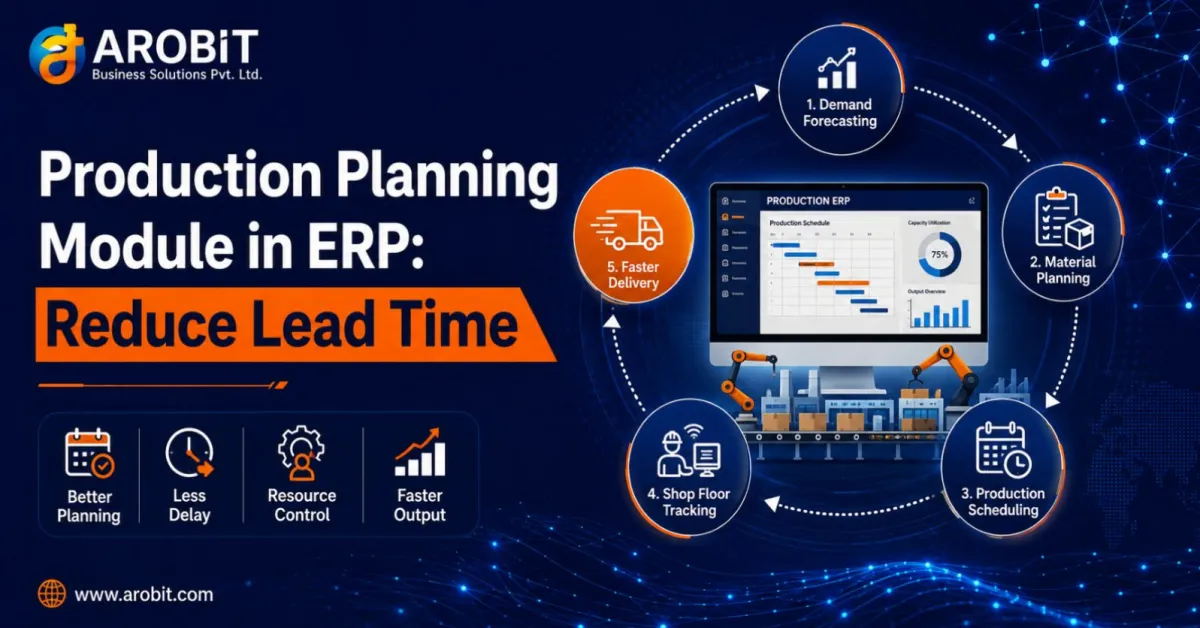
Ask a plant manager why an order shipped late, and the answer is rarely a single dramatic failure. It is usually an accumulation of small ones. A material shortage nobody saw coming. A machine double-booked for two jobs. A work order that sat in a tray for a day because the previous step finished early and nobody knew. Each delay is minor. Stacked together, they turn a two-week lead time into three.
Lead time is not one problem. It is the sum of every wait, every idle machine, and every piece of missing information between an order arriving and a product shipping. The Production Planning Module in ERP exists to shrink that sum by replacing guesswork and disconnected spreadsheets with one coordinated plan.
This guide explains how that module works through four connected functions: MRP, work orders, machine scheduling, and shop floor control. It shows how each one attacks lead time directly.
What "Lead Time" Actually Contains
Before the module, it helps to see what lead time is really made of. Most of it is not production.
Total manufacturing lead time includes queue time, setup time, run time, move time, and wait time. In many plants, actual machining is a small fraction of the total. The rest is waiting: for materials, for a free machine, for the previous operation, for information. That is the good news, because waiting is exactly what better planning removes.
The measurable payoff is well documented:
Manufacturers with formal performance measurement achieve 24% higher overall equipment effectiveness and 18% better on-time delivery than those without. — Aberdeen Group
A Production Planning Module in ERP is how that measurement becomes action, turning data about delays into a plan that prevents them.
Function 1: MRP, So Material Is Never the Bottleneck
The Production Planning Module in ERP starts with materials. Shortages are one of the most common causes of delay, and one of the most avoidable. Material Requirements Planning, or MRP, is the part of the module that makes sure the right materials are available at the right time.
Here is what MRP does in plain terms:
- It reads demand. Sales orders and forecasts tell the system what needs to be built and when.
- It explodes the bill of materials. For each product, it calculates every component and raw material required.
- It checks stock and supplier lead times. It compares what is needed against what is on hand and what is on order.
- It raises purchase and production suggestions. It flags what to buy or make, and when, to hit the schedule.
The effect on lead time is direct. When materials arrive planned rather than panic-ordered, production is never waiting on a missing component, and the expensive scramble of emergency purchasing disappears.
Function 2: Work Orders That Keep Jobs Moving
Work orders are the next job of the Production Planning Module in ERP. A work order is the instruction to make something, and how it flows through the plant decides how much time is lost between steps.
A good Production Planning Module in ERP manages work orders as living records, not paper slips:
- Clear routing. Each work order carries its sequence of operations, so everyone knows what happens next.
- Real-time status. The order's stage is visible live, so a finished operation triggers the next rather than sitting idle.
- Linked materials. The work order ties to the MRP plan, so a job is not released until its materials are confirmed.
The lead-time gain here is the elimination of dead time between operations. When the system signals that a step is done and the next can start, work stops waiting in trays. Nobody has to notice a job is ready, because the system already knows.
Function 3: Machine Scheduling That Matches Capacity to Reality
Machine scheduling is where the Production Planning Module in ERP wins or loses lead time. Scheduling decides which job runs on which machine and when, and a bad schedule creates queues out of thin air.
A capable module schedules against real capacity:
- Finite capacity scheduling. It plans against what machines can actually do, not an infinite ideal, so it never promises impossible throughput.
- Backward scheduling. It works back from a due date to determine exactly when each operation must start to finish on time.
- Conflict detection. It flags when two jobs need the same machine, so the clash is resolved in planning rather than on the floor.
- Maintenance awareness. It accounts for planned downtime, so a schedule is never built on a machine that will be offline.
The result is fewer bottlenecks and less idle time. When machine time is planned realistically, jobs stop colliding, and the queue time that inflates lead time shrinks.
Function 4: Shop Floor Control, So the Plan Meets Reality
The Production Planning Module in ERP is only as good as its connection to what is actually happening on the floor. Shop floor control is the feedback loop that keeps the plan honest.
Good custom ERP software closes that loop:
- Live production data. Operators report progress, so the system knows real status rather than an assumption.
- Actual versus planned. The module compares what is happening against the schedule, surfacing delays as they occur.
- Fast re-planning. When reality diverges, the schedule adjusts, rather than becoming a fiction everyone ignores.
This is what stops a plan from drifting. Because the floor reports back in real time, a delay in one operation is visible immediately. The schedule adapts before that delay cascades into a late shipment.
How the Four Functions Reduce Lead Time Together
Individually, each function of the Production Planning Module in ERP helps. Together, they compound, and that is the real point of a Production Planning Module in ERP.
- MRP ensures material is ready, removing supply waits.
- Work orders keep jobs flowing, removing dead time between steps.
- Machine scheduling removes queue time and machine conflicts.
- Shop floor control catches delays early, before they spread.
Attack all four sources of waiting at once and the effect on total lead time is far greater than any single fix. A plant that removes supply waits, operation gaps, machine queues, and hidden delays together often finds its lead time falls substantially. It was mostly waiting to begin with.
A Note on Arobit's Manufacturing Work
This is not theoretical for Arobit. Arobit builds custom manufacturing ERP with production planning, scheduling, and shop-floor tracking. Documented results include an apparel operation running 25,000 garments per day that reduced defects by 22%, alongside real-time production dashboards.
That kind of outcome comes from a system designed around a specific plant's flow, not a generic template. A well-built Production Planning Module in ERP reflects how a particular operation actually schedules, sequences, and tracks work. That fit is what custom ERP software delivers, and what an off-the-shelf tool rarely matches.
What to Check Before You Start
A few specifics separate a planning module that cuts lead time from one that just records it:
- Finite capacity scheduling. The system must plan against real machine capacity, not an infinite ideal.
- Live shop-floor feedback. Confirm operators can report progress so the plan reflects reality.
- MRP tied to work orders. Material planning and job release should be connected, not separate.
- Fast re-planning. When a delay hits, the schedule should adjust quickly rather than break.
How to Get Started
Roll out a Production Planning Module in ERP in stages rather than all at once:
- Start by getting MRP and accurate inventory right, because material waits are the most common delay.
- Add work-order tracking and machine scheduling next, to attack queue and dead time.
- Then connect shop-floor feedback, so the plan stays honest and adapts. An experienced ERP software development company will sequence this rollout with you rather than switching everything on at once.
A manufacturer that gets material planning and realistic scheduling in place has already removed the two largest contributors to long lead times.
What to Do Next
Measure one thing first: what share of your total lead time is actual production, and what share is waiting. In most plants the waiting share is far larger than managers expect, and that gap is the opportunity.
Then attack the biggest source of waiting first, usually material shortages or machine queues, and build from there. A Production Planning Module in ERP pays back fastest when aimed at the largest wait. In manufacturing, where every day of lead time is cost and risk, a coordinated plan is not overhead. It is the fastest route to shipping sooner.
Speak with our team to scope a production planning module built around how your plant actually runs. Get in touch with Arobit









Comments
No comments yet. Be the first to share your thoughts!