




A customer rarely announces they are leaving. There is no angry email, no cancellation call, no final complaint. Instead, the logins slow, the support tickets go quiet, and the renewal date arrives without a single conversation. One day the account is simply gone. The warning signs had been building for weeks, sitting in the data the whole time, unread.
This is the quiet truth about churn. It is rarely sudden, and it is rarely unavoidable.
Research attributed to Bain & Company found that a 5% increase in customer retention can raise profits by anywhere from 25% to 95%. — Harvard Business Review
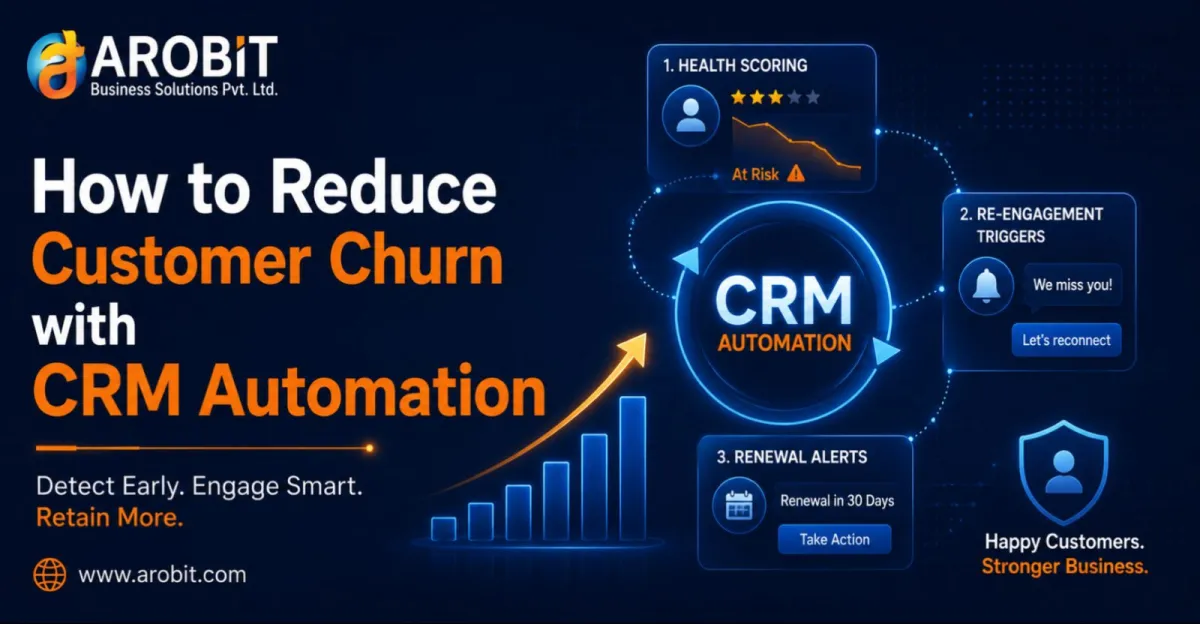
The reason so much churn slips through is simple: watching every customer for early warning signs, by hand, is impossible at any real scale. A team cannot manually track the engagement of hundreds or thousands of accounts and act the moment one starts to slip. This is exactly the work CRM Automation is built to do. This guide shows how it reduces churn through three mechanisms: health scoring, re-engagement triggers, and renewal alerts.
Why Churn Is a Detection Problem
Before the solutions, it helps to name the real issue. Most churn is not a pricing problem or a product problem. It is a detection problem.
The signs that a customer is disengaging almost always appear before they leave. Usage drops. Interactions slow. A support issue goes unresolved. The difficulty is not that these signals are hidden. It is that no human team can watch them across every account, all the time.
- The signals exist. Declining logins, falling order frequency, and rising complaints are all visible in your data.
- They appear early. Disengagement shows up weeks or months before an actual cancellation.
- Nobody is watching. Without automation, these signals sit unnoticed in the system until it is too late to act.
Much of this loss is avoidable. Industry research suggests a large majority of churn is preventable through better, timelier engagement, which is precisely what automation makes possible. CRM Automation turns churn from something you discover after the fact into something you can see coming and prevent. That shift is the core of any serious customer churn reduction effort.
Mechanism 1: Customer Health Scoring
The foundation of proactive retention, and the first job of CRM Automation, is knowing which customers are at risk before they leave. Health scoring is how a CRM answers that question automatically.
A health score combines signals into a single, trackable measure of how healthy each customer relationship is:
- Engagement signals. Login frequency, feature usage, or order regularity, depending on your business.
- Support signals. Open issues, complaint frequency, and how quickly problems get resolved.
- Commercial signals. Payment timeliness, spending trends, and contract value over time.
CRM Automation calculates this score continuously and flags accounts as their health declines. Instead of a team guessing which customers need attention, the system surfaces the at-risk ones automatically, so effort goes where it actually matters. A dropping score is an early warning that triggers action while there is still time to act.
Mechanism 2: Automated Re-Engagement Triggers
A health score is only useful if something happens when it drops, and CRM Automation is what makes that happen. Re-engagement triggers are the automated response, turning a warning into an action without waiting on someone to notice.
Good custom CRM development makes these triggers straightforward to define. A trigger is a rule that fires an action when a customer behaves in a certain way. With CRM Automation, these run continuously in the background:
- Inactivity triggers. When a customer goes quiet for a set period, the system sends a check-in or a relevant offer automatically.
- Behavioural triggers. A specific action, or the absence of one, prompts a tailored, timely response.
- Milestone triggers. Onboarding steps, anniversaries, or usage milestones prompt outreach that keeps the relationship warm.
- Escalation triggers. A sharp health-score drop alerts a human account manager to step in personally.
The value is timing. A re-engagement message that lands the moment a customer starts to drift is far more effective. A win-back attempt sent after they have already left rarely works. Automation makes that timing possible at a scale no manual team could match, while still routing the most serious cases to a person.
Mechanism 3: Renewal and Subscription Alerts
For any business that runs on renewals or subscriptions, CRM Automation matters most at the renewal date. That is the moment of highest churn risk. A renewal that arrives unnoticed is a customer halfway out the door.
A capable CRM software development company builds renewal handling so no renewal is ever a surprise:
- Advance alerts. The team is notified well before a renewal is due, with enough time to prepare a proper conversation.
- Risk-based prioritisation. Renewals for lower-health accounts are flagged as higher risk, so attention goes where churn is most likely.
- Automated reminders. Customers receive timely, professional renewal reminders, reducing accidental lapses.
- Follow-up sequences. If a renewal is missed, a structured win-back sequence begins automatically rather than being forgotten.
The effect is that renewals become managed events rather than missed deadlines. When a team knows which renewals are coming and which are at risk, it can act. It protects the revenue that is easiest to keep and most expensive to replace.
How the Three Work Together
Individually, each mechanism helps. Together, they form a continuous retention loop that runs on its own.
- Health scoring identifies who is at risk.
- Re-engagement triggers act on that risk automatically.
- Renewal alerts protect the highest-risk moments.
Joined up, they turn retention from a reactive scramble into a proactive system. The score spots the risk, the trigger responds, and the renewal alert protects the deadline. None of it requires a team to watch every account by hand. That shift, from reacting to preventing, is the whole point of customer churn reduction through automation, and it protects revenue that is far cheaper to keep than to replace:
Acquiring a new customer is estimated to cost five to twenty-five times more than retaining an existing one. — Harvard Business Review, citing Bain & Company
Keeping Expectations Realistic
CRM Automation is not a cure for a broken product or poor service. It is worth being clear about that.
If customers leave because the product does not meet their needs, no trigger will save the relationship, and pretending otherwise wastes everyone's time. What CRM Automation does is catch the avoidable churn. These are the customers who drift away from inattention, who could have been retained with a timely, relevant touch. That is a large share of total churn, but it is not all of it. The honest promise is fewer preventable losses, not zero churn.
Used this way, automation supports the human relationship rather than replacing it. It tells your team who needs attention and when. Their effort lands where it counts, on the customers worth saving while there is still time to save them.
What to Check Before You Start
Thoughtful custom CRM development separates an automation setup that reduces churn from one that just sends messages. A few things matter most:
- Real health scoring. The system should combine genuine engagement, support, and commercial signals, not a single metric.
- Flexible triggers. You must be able to define the rules and actions that fit your customers, not generic templates.
- Renewal visibility. Upcoming and at-risk renewals should be surfaced automatically and early.
- Human escalation. The most serious cases should route to a person, not stay fully automated.
How to Get Started
Roll out CRM Automation for retention in stages rather than all at once:
- Start with health scoring, so you can see which customers are at risk before doing anything else.
- Add re-engagement triggers next, beginning with simple inactivity check-ins.
- Then bring in renewal alerts, so the highest-risk moments are always covered.
A business that can see which customers are slipping, and act on it automatically, has already fixed the largest source of preventable churn. That is CRM Automation doing the work retention teams cannot do by hand.
What to Do Next
Start by looking backward. Take a handful of customers who left recently and trace their history. You will usually find the warning signs were there in the data, weeks before they went. Those signals are exactly what automated health scoring watches for.
Then put a system in place to catch the next ones in time. Keeping a customer costs a fraction of finding a new one. In that light, the ability to see churn coming and act early is not a nice-to-have. It is one of the highest-return uses of a CRM there is.
Speak with our team about building CRM automation that catches churn before it happens. Get in touch with Arobit




Comments
No comments yet. Be the first to share your thoughts!