





Most businesses start with accounting software, and for a while it is exactly right. It records income and expenses, produces invoices, files tax returns, and keeps the books. The trouble begins later, when the business grows past what a bookkeeping tool was ever built to do.
The symptom is familiar. Month-end close drags on for two weeks. Someone is reconciling a basic accounting tool against a spreadsheet for inventory, another for project costs, and a third for accounts payable. Every reconciliation is a chance for a number to be wrong, and finding the discrepancy eats days. The accounting software is not broken. It has simply been outgrown.
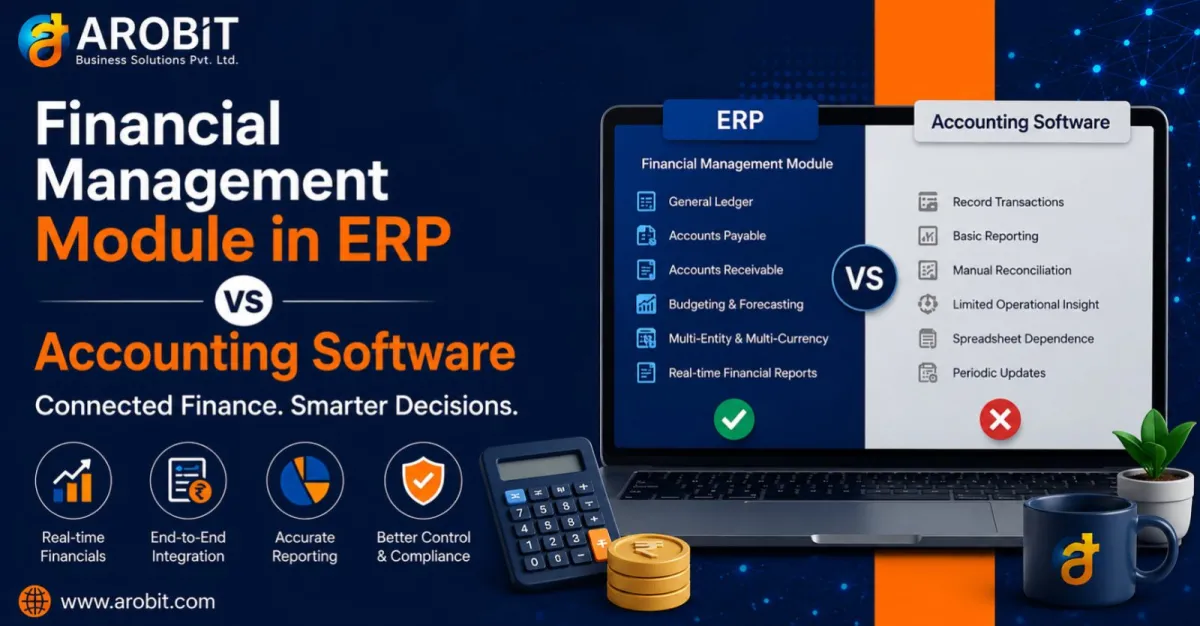
A financial management module in ERP is what comes next. It is not a bigger accounting package. It is finance built into the system that runs the whole business, so the numbers are connected rather than reconciled. This guide explains what the module actually does, and where standalone accounting software runs out of room.
Accounting Software vs a Financial Management Module: The Core Difference
The difference between accounting software and a financial management module in ERP is not about features. It is about connection.
What accounting software does
Accounting software is a record-keeper. It captures financial transactions after they happen and reports on them. It sits apart from operations, so the sales, inventory, and production data it needs has to be entered again or imported, usually by hand.
What the ERP finance module does differently
A financial management module in ERP is different in kind. It is the financial layer of one connected system. A sale, a stock movement, or a completed production order updates the accounts automatically, as it happens. There is no re-entry, because the data was captured once at its source.
That single difference, connected versus separate, is what drives everything else in this comparison.
Why Standalone Accounting Software Runs Out of Room
Accounting tools are excellent at what they were built for. The strain shows when a growing business asks them to do more than record transactions.
Where the strain shows
- Manual reconciliation. Because the accounting tool is separate from operations, finance spends days matching its figures against inventory, sales, and payables held elsewhere.
- No operational depth. A basic tool can tell you total sales, but not profitability by product line, project, or location, because it does not hold that operational detail.
- Version chaos. Critical numbers live in spreadsheets that get copied, emailed, and edited, until nobody is sure which version is current.
- Growth by headcount. When the tool cannot keep up, businesses hire people to enter data and reconcile it, solving a software problem with salaries.
The market has responded to exactly this pain. Connected reconciliation and finance tools are growing fast:
The reconciliation software market was valued at around US$ 2.53 billion in 2024 and is projected to reach US$ 7.54 billion by 2033. — Reconciliation software market research
What a Financial Management Module in ERP Actually Does
A financial management module in ERP handles everything an accounting tool does, then goes considerably further because it is connected to the whole business.
Core capabilities
- General ledger. A single, central ledger that every part of the business feeds automatically, so it is always current. This is the core that good custom ERP software builds finance around.
- Accounts payable and receivable. Invoicing, collections, and payments tied directly to the orders and deliveries they relate to.
- Real-time financial statements. A profit and loss statement, balance sheet, and cash flow that reflect the business now, not last month.
- Budgeting and forecasting. Plans built from actual operational data rather than a separate spreadsheet model.
- Multi-entity and multi-currency. Consolidation across locations, subsidiaries, or currencies handled in one system.
The theme is consistency. Because every figure traces to a single connected source, the finance team stops assembling the numbers and starts analysing them.
P&L You Can Actually Trust
A profit and loss statement is only as good as the data behind it. This is where a financial management module in ERP diverges most sharply from a basic tool.
With standalone accounting software
With standalone accounting software, a P&L is a periodic exercise. Someone gathers figures, reconciles them against other systems, and produces a statement that is accurate as of a point already in the past.
With an ERP finance module
A financial management module in ERP produces the P&L from live, connected data. Because every sale, cost, and adjustment already sits in the system, the statement reflects the current position, not a reconstructed one. More importantly, it can be broken down by dimensions a basic tool cannot see: by product, by region, by channel, by project. That is the difference between knowing the business made a profit and knowing exactly where the profit came from.
Cost Centres: Seeing Where Money Actually Goes
Cost centres are one of the clearest lines between accounting software and a financial management module in ERP. A cost centre is a part of the business: a department, a project, or a location. You track costs and sometimes revenue against it, so you can see how each part performs.
Standalone accounting software typically treats the business as one pool. It tells you total costs, but not which department, project, or site drove them.
What cost-centre tracking reveals
A financial management module in ERP tracks every transaction against its cost centre automatically:
- Departmental performance. See the true cost and contribution of each department, not just a company-wide total.
- Project profitability. Know whether a specific project or contract actually made money once all its costs are counted.
- Location and channel analysis. Compare sites or sales channels on real numbers rather than estimates.
For a business deciding where to invest and where to cut, this visibility matters. It is the difference between managing by evidence and managing by instinct.
Audit Trails and Financial Control
As a business grows, so does the scrutiny it faces from auditors, lenders, and regulators. This is where standalone tools show their limits most clearly, and where control matters most.
A financial management module in ERP builds control into every transaction:
The controls that matter
- Complete audit trail. Every entry and change is logged with who did it and when, so the record answers questions rather than raising them.
- Role-based access. Staff see and edit only what their role permits, which protects sensitive financial data and enforces separation of duties.
- Approval workflows. Payments and journal entries route through defined approvals, so control is built into the process rather than added afterward.
External auditors and lenders read the quality of a business's records as a signal of how well it is run. A connected system with a clean audit trail is not just easier to audit. It builds the credibility that funding and growth depend on.
The Payoff, in Numbers
The practical return of moving to a financial management module in ERP is measurable, and it shows up first at month-end.
Teams that move to automated, connected reconciliation typically cut reconciliation labour by 50 to 75% and close the books 30 to 50% faster. — Abacum and Thomson Reuters research
That is the difference between a finance team spending two weeks on close and one spending three days. The time recovered is redirected from assembling numbers to interpreting them, which is where finance actually adds value.
When Do You Need to Make the Move?
Not every business needs a financial management module in ERP yet. A few honest signals show when the moment has arrived:
Signs you have outgrown accounting software
- Slow close. Month-end takes more than a few days because of reconciliation across disconnected sources.
- Blind spots. You cannot easily see profitability by product, project, or location.
- Spreadsheet dependence. Critical financial processes rely on spreadsheets that are copied and emailed.
- Growth strain. You are adding headcount mainly to enter and reconcile data.
If several of these are true, the business has likely outgrown standalone accounting, and a connected module will pay back the change quickly.
A Note on Arobit's Approach
This is not theoretical for Arobit. Arobit builds custom ERP systems with integrated financial management, connecting the general ledger, receivables, payables, and reporting to the operations that generate them.
That connection is the whole point. A finance module delivers its value only when it is genuinely tied to sales, inventory, procurement, and production. Then the numbers flow rather than being re-entered. Building that integration well is what custom ERP software is for. It is why the finance module should be designed around how a specific business actually operates.
What to Check Before You Start
A few specifics separate a finance module that adds control from one that just stores entries:
- True integration. Confirm the module updates automatically from sales, inventory, and production, with no re-entry.
- Cost-centre tracking. The system must tag every transaction to a department, project, or location.
- Real-time statements. P&L, balance sheet, and cash flow should reflect the current position, not a monthly reconstruction.
- Audit trail and access control. Every change logged, with role-based permissions and approval workflows built in.
How to Get Started
Move from accounting software to a financial management module in ERP in stages rather than all at once:
- Start with the general ledger and core financial statements, connected to your operational data.
- Add cost-centre tracking next, so you can finally see where money is made and lost.
- Then bring in budgeting, approvals, and multi-entity consolidation as the business needs them.
A business that connects its finance to its operations has already removed the reconciliation burden that slows every close. An experienced ERP software development company will phase that connection rather than switching it all on at once.
What to Do Next
Measure one thing first: how many days your month-end close takes, and how much of that time is reconciliation rather than analysis. That number is the clearest measure of what disconnected finance tools are costing you.
Then connect the finance function to the systems that feed it, and the close shortens on its own. That is what a financial management module in ERP is built to do. In a growing business, where decisions depend on knowing the real numbers now, connected financial data is not a luxury. It is the foundation everything else is built on.
Speak with our team about an ERP finance module connected to how your business actually operates. Get in touch with Arobit






Comments
No comments yet. Be the first to share your thoughts!